SHEBA (Structural Homology by Environment-Based Alignment)
Examples (Cont'd)
III. Multiple Alignment
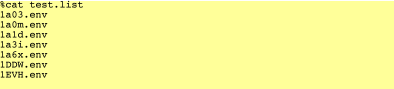
SHEBA can also compare one structure against many with different kinds of output. First, create a simple text file with a list of (.env) file names to be compared with (currently the program does not process a list of (.pdb) file names). Name the text file with (.list) extension and save at the same directory as those of (.env) files. Here is an example:
1. Convert (.list) to (.db): Back to Manual
Use -D option to create a (.db) file, a preprocessed binary file of (.list), for faster processing of multiple alignment. Please note that if the SHEBA program is re-compiled, you have to re-run this option to get proper (*.db) file.
sheba -D test.list
Output: 
2. One-to-Many Alignments with Insertion: Back to Manual
With -I option, the first structure in the (.db) file (converted from (.list) file is aligned with all the structures in that file. A row formatted output with insertion is stored in another file with (*.I.out) extension in the same directory.
%sheba -I test.db
Output: 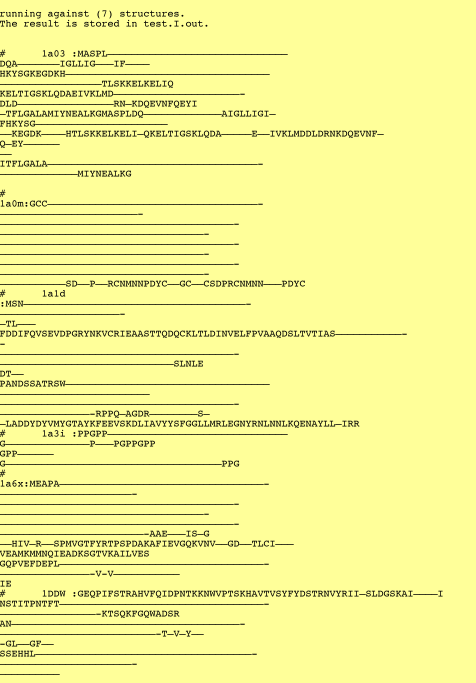
3. One-to-Many Alignments without Insertion: Back to Manual
This -J option aligns the first structure in the (.db) file (converted from (.list) file with the rest of the structures in that file. A row formatted output without insertion at the gaps is stored in another file with (*.J.out) extension in the same directory.
%sheba -J test.db
Output: 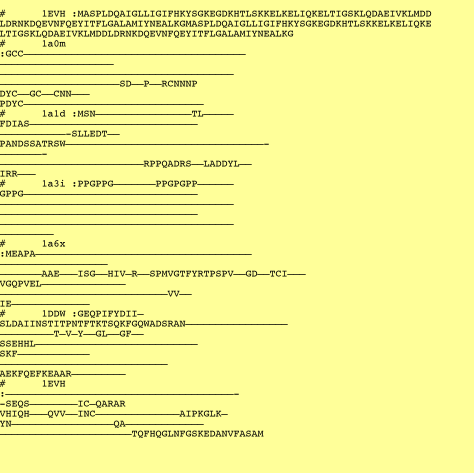
4. One-to-Many Alignments Summary-Only Output: Back to Manual
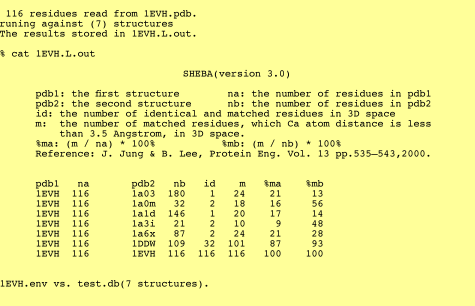
There are two options for multiple alignments summary-only output and the results are the same. The input file can be (.pdb) format or (.env) format. The -A option takes (.db) files and the output is stored in a file with (.A.out) extension in the same directory. While -L option takes (.list) file and the output file has (.L.out) extension.
%sheba -A 1EVH.pdb test.db
Output:
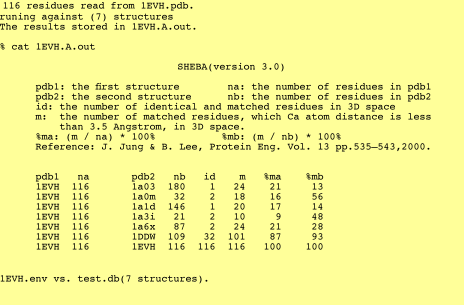
%sheba -L 1EVH.pdb test.list Back to Manual
Output: